
Defining Provider Quotas
Provider quotas limit the number of trips a provider can perform for each passenger space type during a defined time interval during a day, regardless of the run or vehicle that transports the client.
Before you begin
About this task
-
2 ambulatory clients (AM), 1 wheelchair client (WH), and 1 oversized wheelchair client (WX) every 24 minutes from midnight to noon.
-
2 ambulatory clients (AM), 2 wheelchair clients (WH), and 2 oversized wheelchair clients (WX) every 24 minutes from noon to midnight.
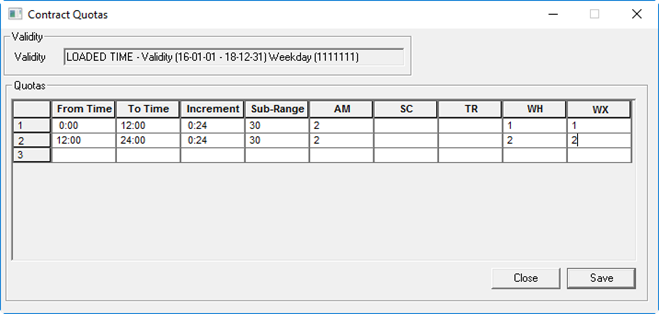
These space types are defined in ancillary data.
If a provider has already met this quota during a time interval and an additional passenger with this space type is scheduled on to a run, a CQ (costing quota) violation will occur.
Procedure
- In the Contract frame, click the contract for which to define cost quotas.
- In the Validity frame, select a validity in the grid.
-
Click Edit.
The buttons in the Validity frame become available.
-
Click Quotas.
The Contract Quotas dialog box appears.
-
In the first available row, provide the following information:
- From Time
- Type the starting time of the provider quota.
- To Time
- Type the ending time of the provider quota.
- Increment
- This field is automatically populated based on the value typed in the Sub-Range column. The Increment value is the number of hours of service divided by the sub-range value. For example, if a provider offers service from 8:00 to 17:00, and the sub-range value is 9, the increment is one hour and quotas for each space type are specified per hour.
- Sub-Range
- Type the number of minutes in a time interval during the defined time range.
- Space Types
- For each space type, type the maximum number of clients that the provider can transport during a sub-range time interval.
- Create additional quotas for other time ranges as needed.
- Click Save.