
Adding OBT Factors
Max OBT Factors define the maximum on board time for clients based on the direct travel time of trips.
Before you begin
About this task
Procedure
-
Click .
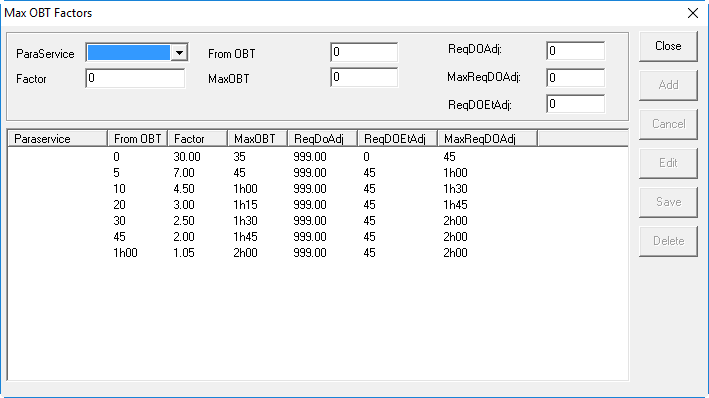
The Max OBT Factors dialog box appears.
-
Select a ParaService type.
If you offer service to only one type of client and have NOT defined any service types in Paraservice Type ancillary data, choose N/A.
-
In the From OBT field, specify the earliest direct travel time
(DTT) for which to apply the OBT factor.
Time ranges can be measured from 0–5 minutes, 5–10 minutes, 10–20 minutes, 20–40 minutes, and so on.
-
In the Max OBT field, type the absolute Max OBT to be imposed
for each direct travel time range.
This is an optional factor.This value is NOT the Max OBT produced by the system using the equation DTT × Factor = Max OBT. The system always uses the Max OBT calculated from the equation unless the product is greater than the Max OBT specified here.Example 1: There is an ADA trip with a direct travel time (DTT) of two minutes. This trip falls within the 0–5 minute travel time range so you would use a factor of 5. Using the equation (DTT × Factor = Max OBT), the maximum on board time for this trip is ten minutes.Example 2: There is another ADA trip with a direct travel time of 4.5 minutes. This also falls within the 0–5 minute travel range so you still use a factor of 5. Using the same equation (4.5 × 5 = 22.5), the Max OBT produced is 22.5; however, this row has a fixed Max OBT of 20 minutes. For this trip, the system uses a Max OBT of 20 minutes.
-
In the Factor field, type the value to multiplied by the direct
travel time of a trip.
This determines the maximum OBT for a specific trip.
-
In the ReqDOAdj (Requested Drop-off Adjustment) field, type the
requested drop-off adjustment value.
This determines trip time based on distance and speed factors for Trip Booking.
-
In the ReqDOEtAdj (Requested Drop-off Early Time Adjustment)
field, type the requested drop-off early time adjustment value.
This determines early arrival time for Trip Booking.
-
In the MaxReqDOAdj (Maximum Requested Drop-off Adjustment)
field, type the maximum request drop-off adjustment value.
This determines the maximum trip time allowed based on distance and speed factors for Trip Booking.
- Click Add.