
Changing Schedule States from Schedule Administrator
Schedule states can be changed manually as needed.
Before you begin
To alter schedule states in either System Administrator or Schedule Editor, the user must be granted the Trapeze6 security permission .
About this task
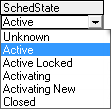
- Active
- Active Locked
- Activating
- Closed
Procedure
- In the Schedules grid, select the schedule.
-
In the SchedState list, click an option:
-
Move the pointer to a different location on the grid and click.
A confirmation message appears.
- Click Yes.