
Address Matcher Finds No Matches
Condition
Address Matcher returns no suggestions.
Cause
Part of the address entry is incorrect.
Remedy
-
Do one of the following:
- In the top half of the grid, overwrite the street number or cross street.
- If you are unsure about the spelling of the street name, click on the Street Name field, and then in the list, click the correct street.
-
Click the Retry Match button:

A list of possible matches is generated in the bottom grid.
-
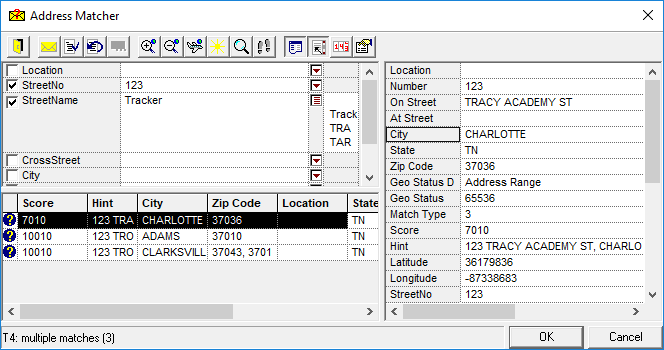
To view detailed information about each match option, highlight the option, and then click the Show Details button.
The right side of the dialog box shows detailed information for each selected address in the results area. -
Click a detail name in the right grid to add information to the results area. For example, click on City.The column heading is added to the results area and available information for all matched records is visible in the column. To remove the column from the results area, double-click on the column heading.
-
To sort matches, click a column heading by which to sort.
For example, click Score and the matches are sorted from closest to farthest match; click City and the matches are sorted alphabetically by city. -
If an acceptable match is generated, select the match option and click the Accept button.The address is geocoded and the text turns black.

-
If no matches were generated, click the Street Wizard button:
If you cannot find the street name using the Street Wizard, the name is not a valid street name on the map. Contact the person who provided the data to verify that the street name is missing from your map.