
Changing the Map Zoom Level
You can control the appearance of the map with the vertical zoom slider. It has controls for the lowest zoom level (-) and the highest zoom level (+).

-
To zoom in and see more detail in a smaller area, do one of the following steps:
- On the slider, click the Zoom In button:
 .
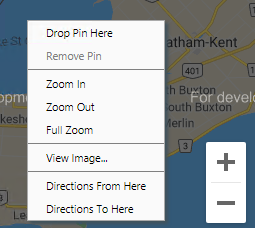
. - Right-click on the map and click Zoom In in the shortcut
menu.
- On the slider, click the Zoom In button:
-
To zoom out and see less detail in a wider area, do one of the following steps:
- On the slider, click the Zoom Out button:
 .
. - Right-click on the map and click Zoom Out in the shortcut menu.
- On the slider, click the Zoom Out button:
-
To view the entire map, right-click on the map and choose Full
Zoom in the shortcut menu.
The zoom level is based on the configuration of the appropriate map context properties.