
Standard Report Parameters
For most standard reports, you must configure some parameters, which are shown in the middle pane.
Reports without Parameters
The following standard reports do not require parameters: (There are no parameters shown in
the middle pane.)
- Amenity List
- Attribute List
- Amenity and Attribute Associations
After selecting one of these reports, click the preferred Delivery Option and Output Option, and then click Report.
Reports with Shared Parameters
The following standard reports share the same set of parameters:
- Amenities and Attributes > Point Amenities by Selected Point Type
- Amenities and Attributes >Point Attributes by Selected Point Type
- Amenities and Attributes > Stop Count by Amenity
- Administration > Stop Count by Signout
- Administration > Deleted Points
- Images > Stops without images
- Images > Stops with Image No Default
- Images > Stops with images
- Images > Stops with Default Image
- Spatial Information > Stops Missing Geocodes
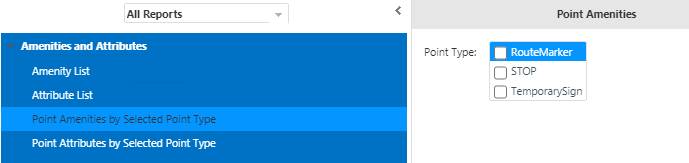
When you select one of these standard reports, the following options are shown:
- RouteMarker
- Stop
- Temporary Sign
After selecting the report you want, select the Point Type you want, and select the preferred Delivery Option and Output Option, and then click Report.