
Calculating Travels
Calculate Travels determines the actual and paid times of drivers between relief points and garages.
To optimize the use of this feature, make sure that the following steps have been completed:
- Nodes and stops in the Lines and Patterns have been geocoded and traces created. Transfers have been defined.
- INFO Engine has been configured and running.
- The default values have been set for the INFO Engine system properties.
Calculate Travels uses the current sign-up period and service group set in the context.
-
Click .
The Calculate Travels dialog appears.
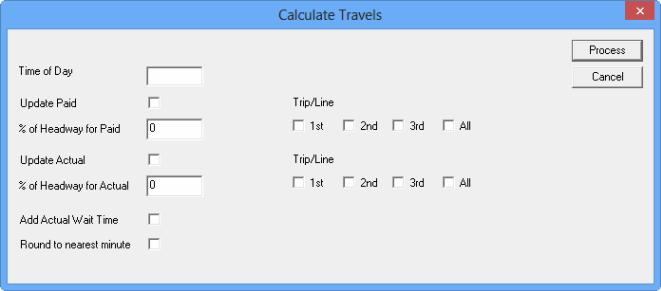
- Select the options and fill in the appropriate fields you want to apply.
- Click Process.
A message showing the number of updated and failed records appears.
The following table describes the different options in the Calculate Travels dialog.
| Field/Option | Description |
|---|---|
| Date | If selected, the calendar allows you to select the date of the travels that you want to process. The current date is shown by default. |
| Select Service Groups and Dates | If selected, the Select Service Groups, Dates and Times dialog appears. You can select the services, dates, and times of the travels that you want to process. |
| Time of Day | Time of day to be used when generating the itinerary. |
| Update Paid? | If selected, the Paid Time is updated. |
| % of Headway for Paid | Percentage of the headway for paid time that will be added to the itinerary time |
| Update Actual | If selected, the Actual Time is updated. |
| % of Headway for Actual | Percentage of the headway for actual time that will be added to the itinerary time |
| Add Actual Wait Time |
If selected, the Actual Wait time is added to the Paid Time and Actual Time. If not selected, the system does not add any actual waiting time in the calculation, that is, time between routes and at the beginning of the travel will not be added. |
| Round to nearest minute |
If selected, the Total time is rounded to the nearest minute. If not selected, the Total time only displays the hour and minutes. The seconds are not shown but the data is stored in the database. |
|
Trip/Line 1st 2nd 3rd All |
For itineraries that require more than one trip, you can select the trip/line that the system starts with for the headway calculation. For itineraries that only require one trip, the system always uses the first trip regardless of the selected trip. |
| Process | If selected, the system calculates the Paid Times and Actual Times of the selected travel records |
| Cancel | If selected, the system does not proceed with the calculation. |