
Finding Information in the Grids
You can apply the Find feature to save you time and effort in searching for data when you have multiple rows on the screen.
-
With the screen where you want to find information open, press
CTRL+F.
The Find dialog appears.
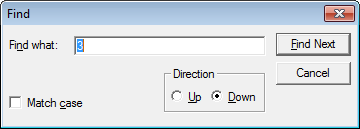
- In the Find what field, enter a key word or words that pertain to the information you need.
-
To refine your search, select the following options:
- In the Direction frame, click the Up or Down option depending on the part of the grid you want the system to search first.
- To search for words that match the case of the key word or words, select the Match case checkbox.
- Click Find Next.
If you enter part of a word (for example, “Zur” instead of “Zurlinden”), BlockBuster searches for the whole word and any other occurrence of the partial word (“Zur”).
The Find function searches where the cursor is (in the active field) and not in the highlighted column when the two are different.