
About Node Aliases on Graphs
For trips graphs, you have the option of changing the aliases that appear on the screen instead of the node abbreviations. An alias is an alternative and easier-to-understand name for a defined data object.
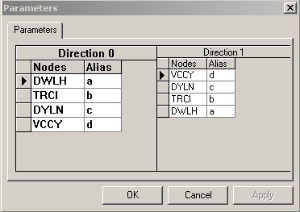
| Fields | Description |
|---|---|
| Direction 0 | Lists the nodes of one direction, for example, Northbound. |
| Direction 1 | Shows the nodes of the opposite direction, for example, Southbound. (If you have
a circular route, the Direction 1 grid will be empty.) Note:
In the Direction 1 grid, the nodes and aliases are arranged in reverse. The grid shows e as the alias for Node VCCY followed by c for Node DYLN, and so on. |
| Nodes | The nodes of the selected line group are listed in the Direction grids. |
| Alias | Alphabetically arranged letters are assigned to each node. As shown in the graphic, a is the alias for Node DWLH then b is for Node TRCI, and so on. |