Place text in quotation marks for exact match search results.
Associating Exception Combinations with Service Groups
Associate exception combinations with the applicable service groups so that only the applicable exception combinations are available when performing Trip Building, Blocking, and Runcutting.
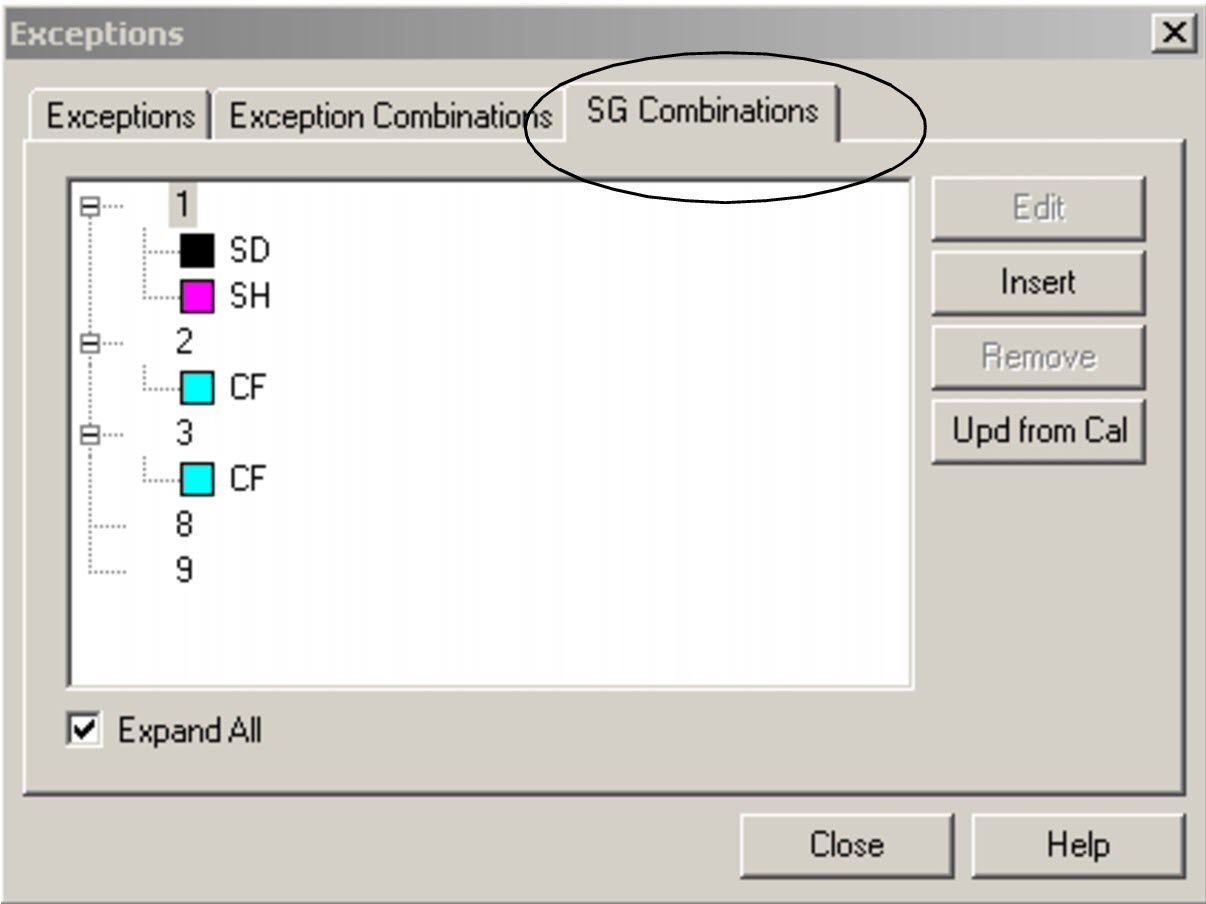
Select the SG Combinations tab in the
Exceptions dialog box.
The tab shows a list of service groups.
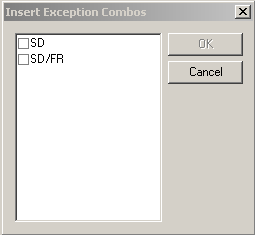
Click Insert.
The Insert Exception Combos dialog box appears.
Select the appropriate exception combinations.
Click OK.
The selected exception combinations appear below the service group number on the
SG Combinations tab in the Exceptions dialog
box.
To view all exception combinations associated with each service group, select
Expand All.
Optional: If the exception combinations have been set in the Exception calendar on the
Exception Combinations tab (using Method 2: Using the Calendar),
click Upd from Cal.
The system inserts the appropriate exceptions into each service group
combination based on the information in the calendar.
To disassociate an exception combination from a service group, select the exception combination and click Remove.
Click Close.
The SG Combinations tab also allows you to edit exception
combinations. To edit an exception combination on this tab, click
Edit and follow the procedure outlined in Editing Exception
Combinations.