You can identify line groups for driver blocks using the Line
Groups tab in the Lines dialog box.
To use driver blocks, you must set the Use Driver
Block system property to Yes. Contact your system
administrator for more information.
-
Click .
The Lines dialog box appears.
-
On the Line Groups tab, select the line group in which you want to
create driver blocks.
-
Click Edit.
The
Edit box appears.
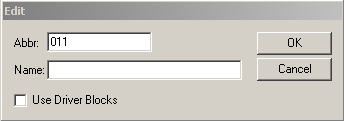
The number of the selected line group appears in the Abbr
field.
-
In the Name field, type an appropriate name for the line
group.
-
Select the Use Driver Blocks check box.
-
Click OK.
On the Line Group tab, the initials DB appears beside the
selected line group.
-
Click Close.
-
On the Blocking screen, click the Close
button:

-
Open the Blocking screen again and check that the screen name on
top of the screen also shows the same identifier as follows: [Blocking <D-Blk>].
