
Travels Tab
The Travels tab contains fields and controls similar to those on the Deadheads tab in the Blocking screen.
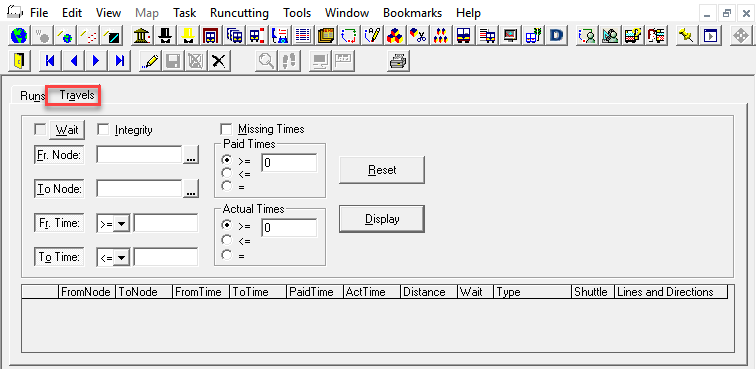
| Option | Description |
|---|---|
| Fr. Node | The garage or relief point from which an operator begins to travel. |
| To Node | The garage or relief point to which an operator travels. |
| Fr.Time | The start of the time range when the travel is valid. |
| To Time | The end of the time range when the travel is valid. |
| Paid Time | The amount of time that an operator travels to and from his or her assigned vehicle for which he or she is paid based on the union agreement. |
|
Act (Actual) Times |
The amount of time that an operator travels to and from his or her assigned vehicle based on reality. This is also known as feasible travel. |
| Distance | The distance that an operator travels to and from his or her assigned vehicle. |
| Wait (and Travel) | The column is set to Yes if the travel was created by the Waits and Travels function. |
| Type (of Travel) |
Used in FX only in conjunction with Trapeze Blockbuster. The options are: Start, End, Start and End, Piece Break, or Shift Break. The value in this field restricts when the travel occurs. For example, you could create a travel that is restricted to occurring at the start of a run. |
| Shuttle |
Used in FX only in conjunction with Trapeze Blockbuster. Choose Yes or No. Yes indicates that a shuttle is used to transport an operator to a relief point. Please refer to Blockbuster documentation for more information on setting scheduling parameters when using shuttles. |
| Comments (To view, click or right-click the screen and choose from the menu.) | An observation or remark regarding the travel, for example, reminders about the length of the travel. |
| Lines and Directions | Read-only column; shows not only the lines and directions but also information such as the departure time, and exceptions applicable to the waits and travels of the line you selected. |