
Viewing the Supplementary Data and Runs Graph
There are different options to show supplementary data and graphs.
-
To view the supplementary data associated with your run cuts on the
Runs tab, click .
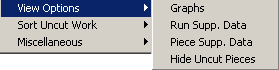
The View Options submenu provides options to access the runs graph and supplementary data.
-
Perform any of the following steps:
- From the list, select Run Supp. Data. The Cut Pieces grid is split in half and the supplementary data defined for your runs appears on the right half of the grid.
- To remove the supplementary data from the grid, click View Options menu and click Run Supp. Data again.
- To view supplementary data associated with the pieces of your runs, choose Piece Supp.Data. The data appears in the same manner as the Run supplementary data.
- To see a graphical representation of the progress of your runcutting, click . The run data is presented in two graph formats in the lower section of
the Runcutting screen.
To remove the graphs, click again.