
Inserting Silence

The Insert Silence command inserts some blank space in the sound at the start marker's position.

Insert a half second of silence at the end of your audio file to ensure that your files are not played very quickly over the Voice Gateway.
  1. With your audio file open, grab the Start marker and drag it to the end of the file.
  2. ClickEdit > Insert Silence.
    The Insert Silence dialog box appears.
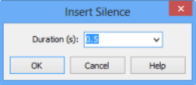
    Insert Silence
  3. From the Duration list, select 0.5.
  4. Click OK.
  5. In the GoldWave screen, click Save.