
Adding Feedback Types
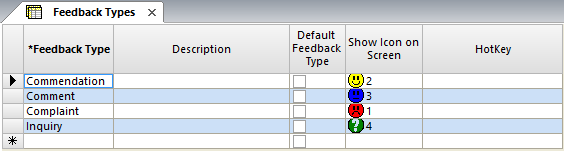
The Feedback Types screen allows you to classify all types of feedback that you may receive. These types are the categories under which Feedback Subtypes are classified.
-
Click .
-
Click the Add New button:

-
In the Feedback Type field of the new row, type the name of the
feedback type. Some typical examples are:
- Complaint
- Commendation
- Lost & Found
- Inquiry
- In the Description field, type a brief description of the feedback type.
- Optional: To set the feedback type as the default, select the Default Feedback Type checkbox.
-
In the Show Icon on Screen dropdown list, select an appropriate
icon to represent the feedback type.
COM has five standard icons: Four standard and a placeholder for a custom icon. Contact your Trapeze representative for more information on custom icons.
- In the HotKey field, type a keyboard shortcut to activate a function quickly.
-
Click the Save button:
