
About Main Manifest Screen
The main screen is the base of the DriverMate application allowing you to interact with all events and access supplementary information.
The Manifest Screen
The main Manifest screen displays the following information.
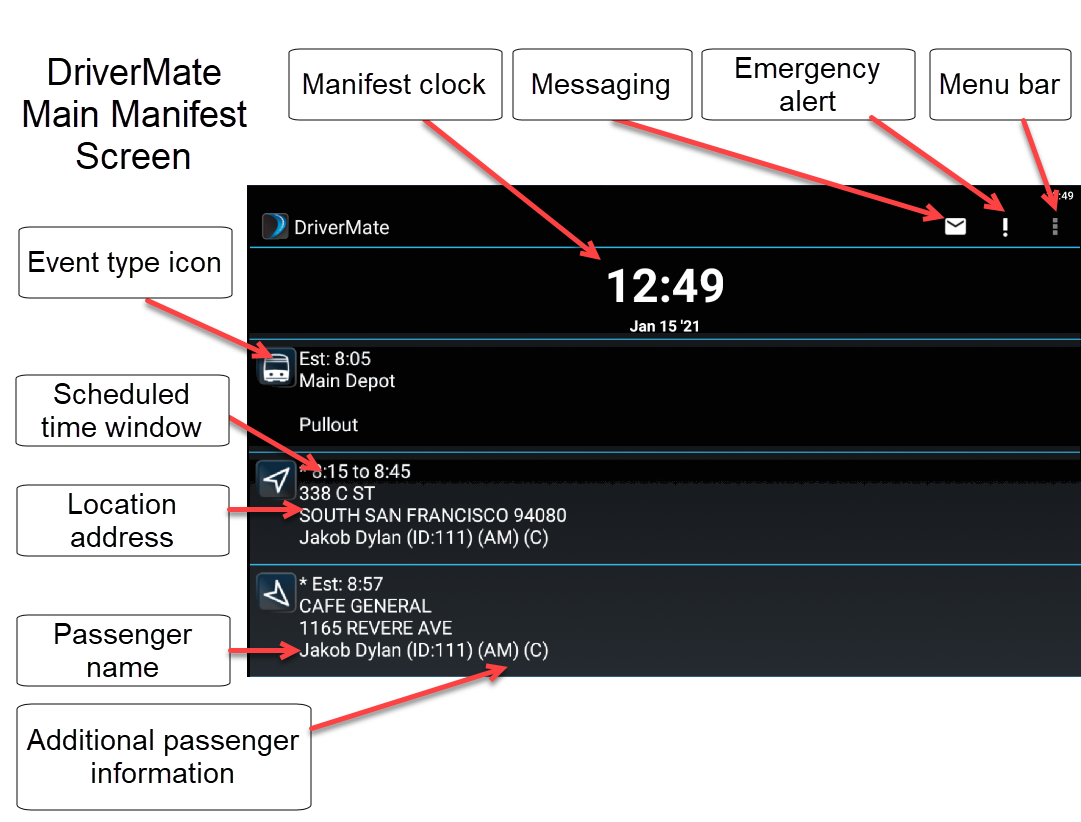
Events drop off the Manifest as they are completed.
Optional Screen Items
The buttons and icons displayed on screens may vary according to your configurations. Other items which may be configured to appear on the title bar include:| Item | Icon or Button | Description |
|---|---|---|
| Flag Stop |

|
Depending on the Flag Stop Functionality property setting, this button allows you to add a Flag stop to the Manifest |
| Check Mark |

|
Tap to confirm perform actions for example, confirming your checklist is complete. |
| VoIP |  |
This icon will appear if VoIP is set up and allows for calling Dispatch when a cellular connection is not available. |