
Applying Change Requests
Trips that have been imported to the Trip Plan Analyzer Wizard can be modified and re-evaluated using different criteria, such as the time or date they take place.
Before you begin
About this task
Procedure
-
Select the trips to be modified.
To... Do this... Select multiple adjoining trips Press the SHIFT key while clicking on the first and last trips. Select multiple trips Press the CTRL key while clicking on the trips. Select all trips Click the leftmost cell in the grid heading row. -
Click the Change Request button:

The Modify Request dialog box appears: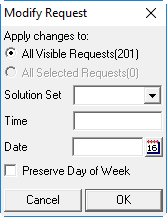
- Specify if the changes should be applied to All Visible Requests or All Selected Requests.
-
Specify the criteria for Solution Set, Time, Date, and select whether to preserve the day of the week.
You can use this feature to select a holiday or a different date to ascertain the availability of fixed route service in that period.
-
Click OK.
The system modifies the batch row selections based on the criteria you entered.
-
To save the solutions, click the Save Batch To DB button:

- In the Save Batch dialog box, type a Batch Name and Description.
- Click OK.