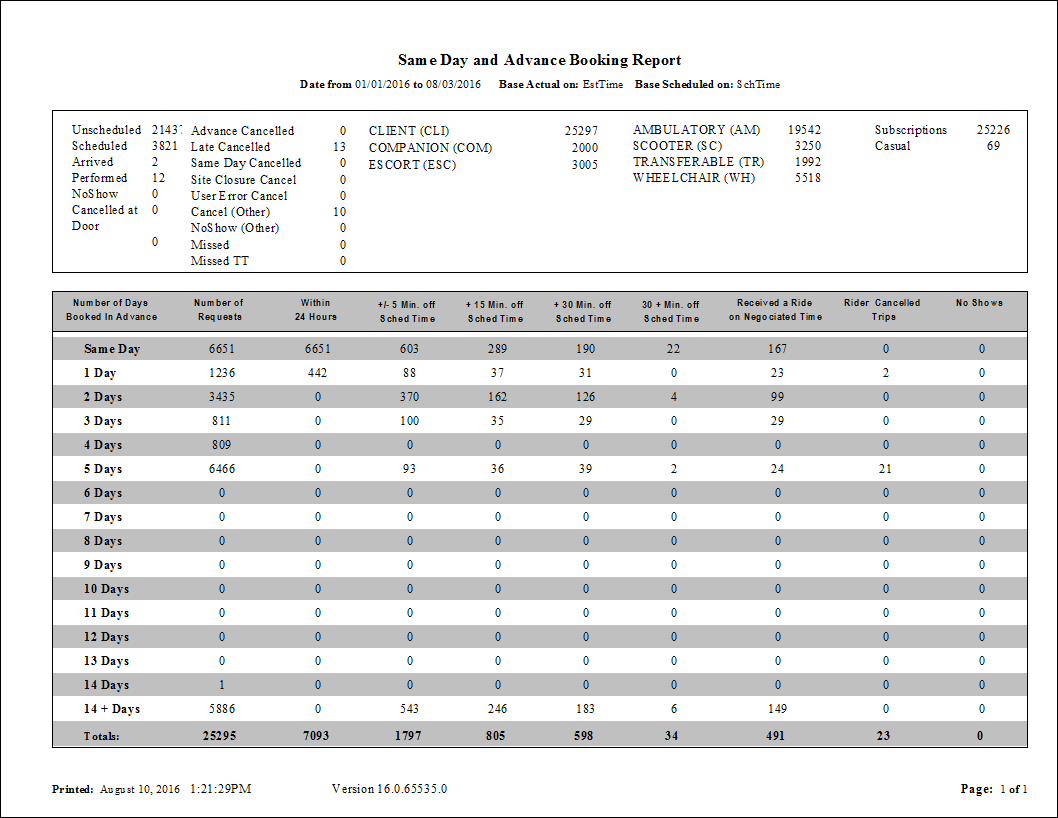
Same Day and Advance Booking Report
The Same Day and Advance Booking report shows bookings and how far in advance the reservations were made.
The report also summarizes how many trips took place more than a specified amount of time before or after their scheduled times. Analysis of this report may indicate times of day when more service is desirable, by showing how far in advance riders are requesting service and not getting the time they want for their trips.
| Parameter | Description |
|---|---|
| From Date | First date of records in the report. |
| To Date | Last date of records in the report. |
| Providers | Select the check box for each provider to include the report. You can use the following buttons:
|
| Offset Minutes | Amounts of time before or after the scheduled times that trips must exceed to be
included in the summary information. For example, +/-5 Min. Off Scheduled will include trips that occur before or after the scheduled time by up to five minutes. The second and third Min. Off Scheduled fields add to this time. For example, typing "15" and "30" in these fields (while using +/-5) will create two columns. The first column will show the number of trips that are over their scheduled time by between 5 and 15 minutes, and the second column will show the trips that are over their scheduled time by between 15 and 30 minutes. The + Min. Off Scheduled Time field defines a threshold. Any trips later that this many minutes will be shown in their own column. |
| Base Actual on | Specifies whether to base actual times on estimated times or actual times. |
| Base Scheduled on | Specifies whether to base scheduled times on scheduled times or scheduled early/late times. |
| Show Details | If selected, the report shows each client trip booking. If cleared, the report shows summary information only. |