
Checking Overlapping Sign-Up Periods

You can check overlapping sign-up periods in the Edit dialog box.

About this task

If overlapping sign-up periods exist, then the one with the Production flag is selected as the schedule's sign-up period. Overlapping sign-up periods occur when the schedule's date falls into the from/to date range of more than one sign-up period. If none of the sign-up periods have the Production flag set, then an error message is placed in the log indicating that the Schedule Server does not know which sign-up period to use and the sign-up period with the lowest SignId value is selected.

Procedure

  1. Click File > Ancillary Data > Fixed > Signup Periods.
  2. Select a sign-up period and click Edit, or double-click a sign-up period.
    The Edit dialog box is open.
  3. Make sure that the Production check box is selected and click OK.
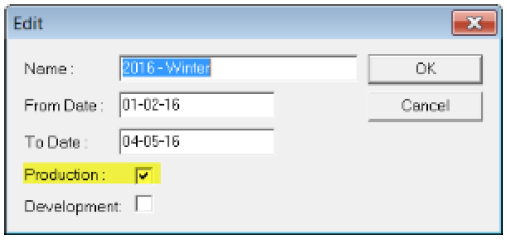
    Edit dialog box with the Production check box highlighted.
    Note: The Production flag should be set at all times for schedules that are to be recognized as sign-up periods.