
Batch Scheduling to Selected Runs
In some cases, you may be required to select specific runs when batch scheduling trips.
About this task
By default, only run groups created by the user are shown for selection. However, when you select the All Users check box, all run groups including those created by other users are available for selection. Run groups are created in the Dispatch screen.
Procedure
-
In the Batch Parameters dialog box, select the options you want,
and then click Run Selection.
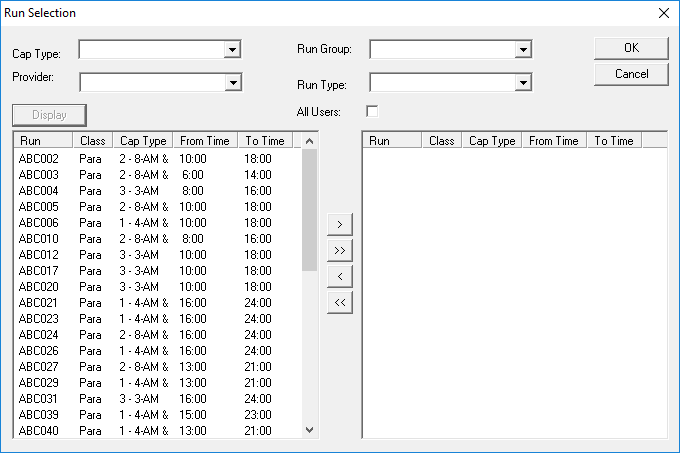
The Run Selection dialog box appears. By default, all runs for the selected schedule are shown in the left grid.
- Optional:
Apply one or more of the following filters:
- Cap Type
- Select one or more capacity types.
- Provider
- Select one or more providers.
- Run Group
- Select one or more run groups.
- Run Type
- Select one or more run types. The run type options listed are defined in the Batch Parameters dialog box by selecting the check boxes below Choose From.
-
Click Display.
All runs matching the search criteria are shown in the left grid.
-
Do one of the following (in the left grid):
- Hold the CTRL key while selecting each run you want to include in the batch schedule and then click the Select (right arrow) button.
- To select all runs, click the Select All (double right arrow) button.
The runs are shown in the right grid. -
Click OK.
The Run Selections dialog box closes.
-
In the Batch Parameters dialog box, click
Start.
The system attempts to schedule trips on the runs that are selected.