
Defining Bad Trip Locator Jobs

The bad trip locator job looks for trips that have a high cost and unschedules them as needed.

Before you begin

Schedule Job Agent must be open.

About this task

The bad trip locator takes every scheduled trip on the selected schedule, removes it, and determines the cost to put it back in the same place. If that cost falls in the defined range, the trip is unscheduled (as long as it can be scheduled somewhere else). Otherwise, it is left alone.

Trips in a second (higher) user-defined range will be deemed so bad that they can be unscheduled even if no other location can be found. Typically, the bottom and top of the higher range should be set to the same value so that trips will only be unscheduled if they can be moved. Otherwise, trips that appear on bump runs are placed there because there is no alternative.

Using the bad trip locator job is typically faster than rescheduling scheduled trips because it does not attempt to reschedule every trip. However, rescheduling scheduled trips will never cause a trip to become unscheduled (which can happen when using the bad trip locator).

Procedure

  1. Select a job from the grid.
    The scheduled job record settings are shown in the Job Schedule frame.
  2. Confirm the Agent Name PassScheduleAgent is defined for the job schedule.
    The selected agent determines the options that are available in the Job Type field.
  3. Click Job Data.
    The Job Data dialog box appears.
  4. Define the schedule type and date information:
    1. In the SchType field, click a schedule type:
      Live or Template.
    2. Optional: In the Schedule list, if setting parameters for a single date or week day, specify a date or day. If the job parameters should apply to all dates or days that the job runs, leave this field set to N/A.
    3. In the Offset field, type the offset from the present date.
      Typing 0 will run the job today. Typing 1 runs the job on the next day’s schedule.

      Using Offset allows you to always run the job for days in the future.

  5. In the Job Type field, select Bad Trip Locator. If no Job Types are available, confirm that an Agent Name has been selected in the Job Schedule frame of the Schedule Job Agent dialog box.
  6. Click New.
    The New Batch dialog box appears.
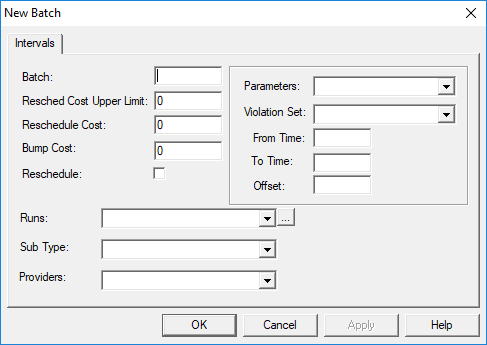
    The New Batch dialog box open to the Intervals tab. No batch information is defined.
  7. Type the Batch name for the job step.
  8. Define the following:
    1. In the Resched Cost Upper Limit and Reschedule Cost and fields respectively, type the high and low limits for a cost range that qualifies a trip as appropriate for rescheduling.
    2. Type an upper limit for a Bump Cost.
      If a trip does not qualify for rescheduling and its cost exceeds the value specified here, the trip is bumped from the run.
    3. Select the Reschedule option if Resched Cost Upper Limit and Reschedule Cost are not specified.
      The system will attempt to reschedule a bad trip before bumping it.
  9. Define the following:
    1. Click a Parameters set to use.
    2. Click a Violation Set to use.
    3. In the From Time and To Time fields, type values in seconds from midnight.
      Trips with estimated pick-up times that fall between these values are considered in the job. These values are used if no offset is specified, or if the schedule is not for the current day.

      If you specify only one of these times, the time window is treated as a maximum or minimum value.

      For example, only typing a value in the From Time or To Time field means that all trips before/after that time are considered.

    4. Type an Offset value.
      Specify a value in seconds only if working on the current day’s schedule. Trips with pick-ups that have estimated times of the offset plus the job interval's starting time are considered.

      When specified, this setting always takes precedence over the From Time and To Time settings.

  10. Define the following:
    1. Runs to search for bad trips.
      Click the ellipsis button (…) to use the Run Selection dialog box.
    2. Sub Types to search for bad trips.
    3. Providers to search for bad trips.
  11. Click OK.
  12. Click OK.
    The Job Data dialog box closes.
  13. Click Save.