
About OBT Factors
OBT factors set rules about how long clients can be on board vehicles.
The Max OBT w/o Transfers and Max OBT with Transfers properties impose a time limit (for example, 1 hour) for passengers on board a vehicle for a single trip. When a passenger’s time on board a vehicle exceeds this time, a violation is incurred. These properties ensure that passengers are not kept on board indefinitely, but because they apply to all trips regardless of pick-up or drop-off locations, they have the potential to keep a client aboard a vehicle longer than necessary. For example, a client is on board for an hour although the trip should take only five minutes.
The OBT Factors based on ReqTime property determines if OBT factors should be based on travel times associated with the Req time used for the pick-up (for example, 8:00 A.M.) or if OBT factors should be based on travel times associated with a midnight start time. If the client's requested time is 8:00 A.M. and the trip is scheduled for 10:00 A.M., the OBT factor would be based on travel times expected for 8:00 A.M., even if traffic is slower at 10:00 A.M. Trapeze recommends setting this property to Yes.
To set these properties, in System Administrator, click , click the System tab, and then click PASS Scheduling. These properties are typically set by a system administrator or a Trapeze representative.
The Max OBT Factors dialog box is allows you to define the maximum on board time for a client based on the particular trip’s direct travel time (DTT). Direct travel time is the estimated duration of a trip from an origin to a destination without any stops or delays in between. If the client is part of a group and it is preferable to start calculating on board time for all group members from the time the last passenger boards, the Enable New OBT Calculation switch (found in Schedule Server) should be set to ON.
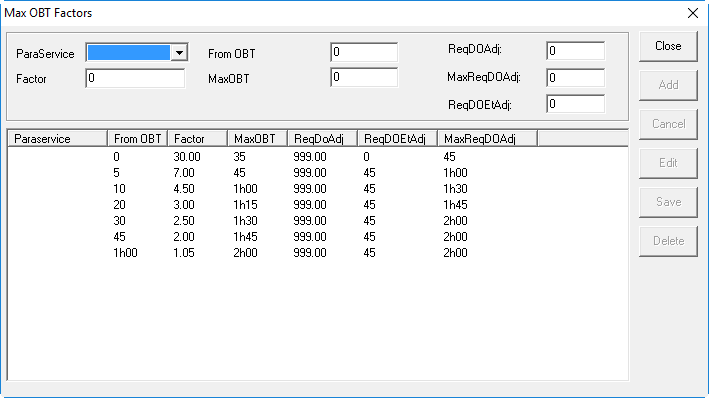
Keep in mind that the maximum on board times calculated by the factors you set up in the Max OBT Factors dialog box are always overridden by the global Max OBT w/o Transfers and Max OBT with Transfers properties. Max OBT values set on a booking always override all other OBT settings for that particular booking.