
Moving or Swapping Trips
You can move trips to other blocks or swap them with other trips.
- On the Cut Pieces grid, right-click on the trip that you want to move or swap.
-
From the shortcut menu, select Move Trips To.
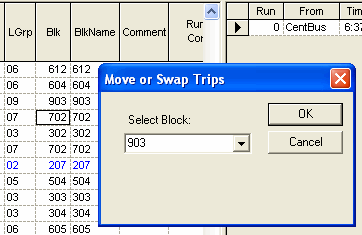
The Move or Swap Trips dialog appears.
-
Click OK.
Alternatively, select another block from the Select Block dropdown list.
By default, if the selected trip is the last piece in the run, the block immediately preceding the block to which it belongs is shown in the Select Block field, for example, in the following graphic, the Select Block field shows 903, which is shown immediately above 702 in the Blk column.
If the selected trip is the first piece in the run, the block shown immediately after the block to which it belongs is in the Select Block field. Following the example shown in the graphic, the Select Block field would have shown 302, which is immediately after 702 in the Blk column.