Place text in quotation marks for exact match search results.
Adding Holidays
Holidays is a General type of ancillary data shared by FX with other Trapeze
applications. The Holidays ancillary data is used to identify days when the standard service is
not operating due to a holiday.
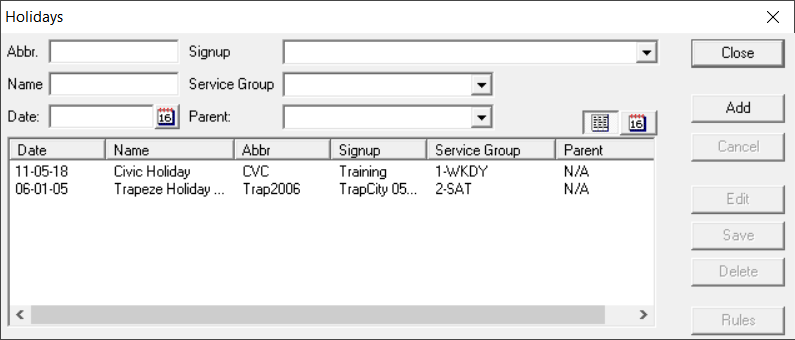
To open the Holidays ancillary data, click File > Ancillary Data > General > Holidays.
The Holidays dialog box appears.
You can resize the dialog box if necessary.
In the Abbr field, type an abbreviation for the holiday.
In the Name field, type the name of the holiday.
In the Date field, type the date of the holiday. To view the
calendar, click the calendar icon:
(Used in PASS and OPS) In the Parent field, identify a new
holiday with an existing holiday. For example, for holiday Christmas 2018 - December 25,
2018, the parent holiday is Christmas 2017. If a date interval rule references a holiday,
it will also apply to another holiday which has that holiday as a parent. This allows you
to add holidays each year without having to revise all of the date interval rules.
From the Signup list, choose a sign-up period.
From the Service Group list, choose a service group.
Important: You must create Service Groups ancillary
data for the menu to be populated.
Click Add.
Note: To view the calendar of existing holidays, click the calendar icon beside
Add: Click the list icon to return to the list of holidays:
Click Save.
The column, Exc Combo shows if there is an exception
applied to the holiday.

 Click the list icon to return to the list of holidays: