Place text in quotation marks for exact match search results.
Building Trips on Run Time Interval or Trip Count
The patterns and run times you have created provide you with the data to build your
trips.
If you are in multi-agency mode and you do not select a service when setting the
context for the Trip Building screen, the Edit button is not activated.
This prevents the creation of trips with incorrect service.
On the Trips tab, make sure your context is set to include the patterns for which you
want to create trips.
Click the Edit button:
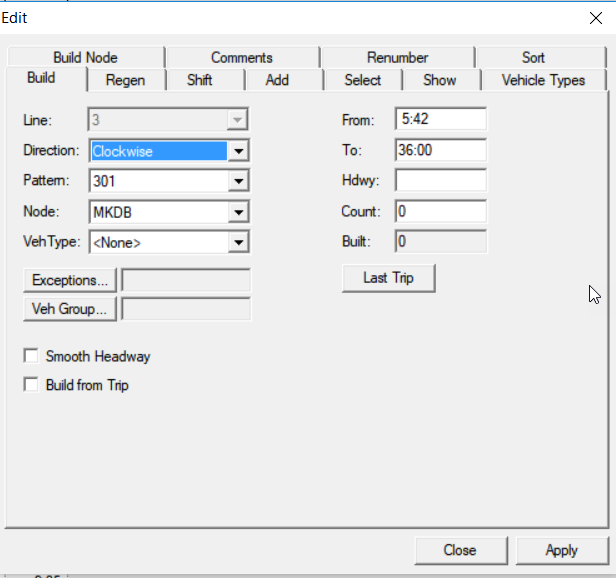
The Edit dialog box appears.
Select the Build tab.
By default, the line field shows the selected line in context.
In the appropriate drop-down lists, select the Direction,
Pattern, and Node options that you want to
use.
To use run time interval, type a start time in the
From field.
To use run time interval, type the end time of the interval in the
To field.
In the Hdwy
(Headway) field, type what you have determined as the frequency of trips in minutes.
Optional: To build trips using a runtime interval, leave the Count field
blank.
To use trip count, type values in the From and
Hdwy fields (see steps 5
and 7). In the Count field, type the number of trips that you
require for the run time interval.
Click Apply.
The new trips appear on the Trips tab and the number of trips built appears in
the Built field. If you entered a value which exceeds the number of
trips that can be accommodated within the selected interval, a message appears warning you
that not all trips were built.
Repeat the appropriate steps depending on how you want to build your trips for the
other patterns.
All the trips built are less than or equal to (<=) the To
time. This means that all trips that are built occur before the to time you entered.
Click Close.
Optional: To prevent changes being made on the trips built, apply the
Freeze option.
The Frz column displays check marks for the selected
trips that have been frozen.