Place text in quotation marks for exact match search results.
Sorting Trips
If you have more than a few trips to work on, use the Sort tab
to change the order in which the trips are displayed.
If you only have a few trips to sort, you can use the
Move Up button: and the Move Down button:
With the Trips tab open, click the Edit button:
The Trips Edit dialog box appears.
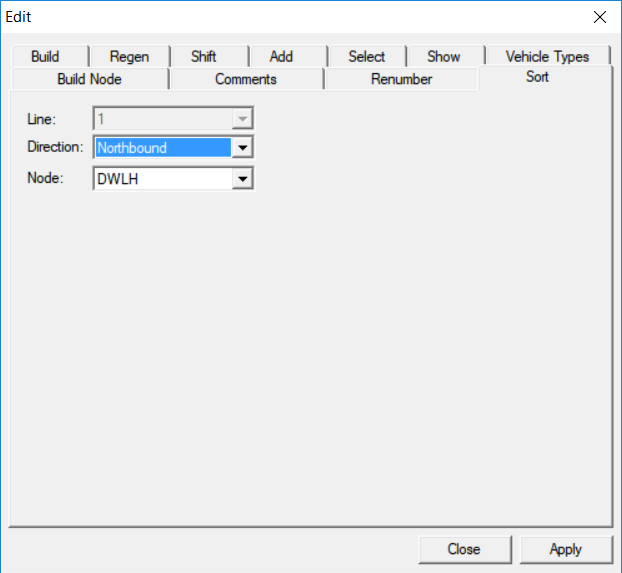
Select the Sort tab.
The following graphic shows sample data:
In the Direction drop-down list, select the appropriate
direction.
In the Node drop-down list, select the node from which you would
like to sort the order of the trips.
Click Apply.
The nodes are sorted in the Trips grid in descending order even though there may
be missing trip times. They are sorted based on the selected node.
Click Close.
If the selected sort node is not on the pattern and there are no common time points
between the pattern and other patterns in the same direction, the build node is applied
as the sort node.
The system assesses a sort node for the line/direction based on build node (or maximum
load point). Every time it is generated, the system tries to get a time for that node. If
there is no node, the system extrapolates a time. Once set, the font for the sort node appears
in italics.

 and the Move Down button: