
Copying Reliefs from One Service to Another
You can copy reliefs from one service group to another service group.
-
On the Unattended Reliefs tab, click Copy.
The Copy dialog appears.
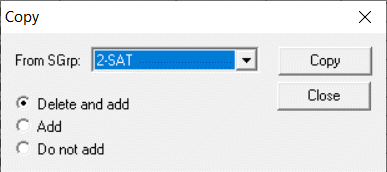
- In the From SGrp dropdown list, choose a service group.
-
Do one of the following steps:
- To overwrite the new reliefs over the old, select the Delete and add.
- To add the new list to the old, select Add.
-
To prevent new records from being added if an old version already exists, select Do not add.
- Click Copy.