
Creating Pattern Turn Lists
The Create Pattern Turn Lists tool creates pattern turn lists and saves them as pattern comments for all or selected lines.
- Click . The Extended FX Data Tool appears.
- In the Service list, choose the service you want. The default is set at <All> for all lines.
-
To select more than one Service, choose
<Custom>.
The Select Service dialog box appears.
-
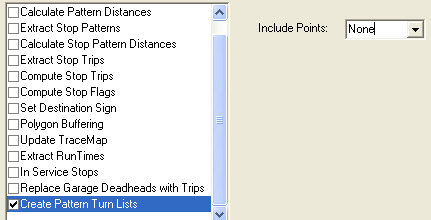
Select the Create Pattern Turn Lists option.
-
In the Include Points list, select one of the following
options:
None: If selected, the points are not included in the turn list.
Nodes: If selected, all points associated with the selected lines are included in the turn list.
- Click Execute.
-
Click Close.
Turn lists are also created on the Patterns tab in the Route Definition screen.