
Loading Node to Node Data
You can quickly create run time records based on your node to node data and ensure consistency in the node to node pairs that may exist on more than one route, pattern and service.
Use the Load function on the Run Times tab.
Note: If you use the Node to Node tab to set your node to node data, be
sure to load the data into your database after adding to or changing your node to node
records. For example, if you changed the run times between node to node pairs, the data is
not updated in your Run Times grids unless you do an update.
The options on the Load tab are:
- Add: Selected by default; the new run time records are added to the appropriate grids.
- Update: Changes made to any of the node to node records are applied to the appropriate records.
-
On the Run Times tab, click the Edit
button:

The Edit dialog box appears.
-
Select the Load tab.
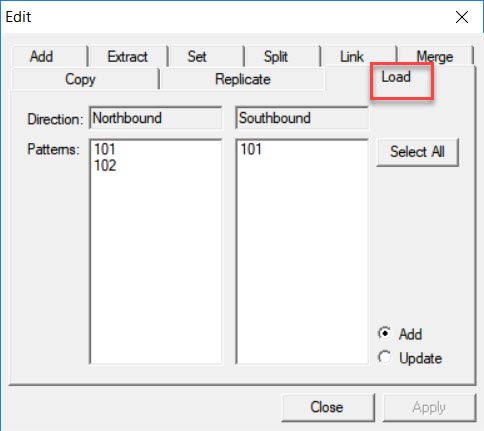
The patterns for each direction are listed in the Patterns frames. The tab shows two Patterns frames below each Direction field.
- Select a pattern from the appropriate direction.
- Optional: To select all patterns, click Select All.
- Leave the Add option selected. The Add feature adds new node to node pairs.
- Optional: To update the existing node to node pairs with new run times. select the Update option.
-
Click Apply.
New run time intervals are added to the Run Times grid. (Some of the run time records may show missing times.
- Click Close.