Place text in quotation marks for exact match search results.
Adding Vehicle Classes
Different types of vehicle classes can be added.
Click Tools > Speed Wizard, or click the Speed Wizard button:
The Speed Wizard dialog appears.
On the Vehicle Classes tab, click the
Edit button:
An empty record appears for entering a vehicle class.
Complete the following fields:
Vehicle Class Abbr - Type an abbreviation for the vehicle
class name.
Description - Type a description about the vehicle
class.
The Vehicle Class ID field is automatically filled
in.
Click the line marked by an asterisk.
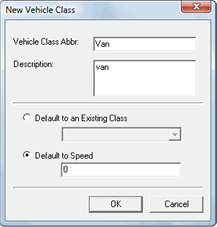
The New Vehicle Class dialog appears.
Select one of the following options:
Default to an Existing Class - Set the default speed for
the vehicle class to the default speed of an existing vehicle class, and then click a
vehicle class in the list. If no other vehicle classes have been defined, this option
appears shaded.
Default to Speed - Specify a default speed for the vehicle
class for all speed types, and then type the speed in the field below the
option.


 An empty record appears for entering a vehicle class.