
Point Check Data on Trips Tab
Trips are displayed in chronological order with the earliest trip at the top and the latest trip at the bottom.
The following graphic shows the Trips tab in point check mode. The selected point is FO1S and the number of Eastbound trips generated is 28.
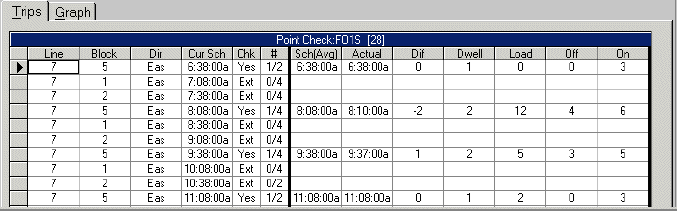
| Options | Description |
|---|---|
|
Line |
The line (route) number to which the trip belongs. |
| Block | Displays the block number of the trip. |
| Dir | Displays the direction of the trip (North, South, East, West). |
| Cur Sch | The time a vehicle is scheduled for arrival at a node or stop. |
|
Chk |
The check status of the trip:
|
|
# |
Displays the check and extraction status of the trip. For example, 0 shows that the trip has neither been checked nor extracted while 1/2 indicates that a trip has been extracted twice but check information has only been entered into the system for one of those times. |
| Sch(Avg) | The scheduled time when the point check was performed. |
| Actual | The actual or observed arrival time of the vehicle at a node. |
|
Dif |
The difference between the scheduled time and the observed time. For example, if the scheduled time for a trip is 7:00 but the vehicle actually arrived at 7:01, the time difference is -1. If the vehicle arrives at 6:59, the time difference is 1. |
| Dwell | The time the bus remains at the node or stop while passengers board and alight. |
| Load | The number of passengers on board the vehicle after all boardings and alightings at a node or stop. |
|
Off |
The number of passengers that alighted (exited) the vehicle at a node or stop. |
|
On |
The number of passengers that boarded the vehicle at a node or stop. |