
Creating Extra Pay Requests on Smaller Screens
Create extra pay requests for work that falls outside of your regular pay.
-
Select menu (
 ), then Extra Pay.
The Extra Pay page appears.
), then Extra Pay.
The Extra Pay page appears. - Optional:
View previously created records:
- Filter records by Extra Pay Type.
- Select a Sort by option.
-
Expand (
 ) extra pay request cards for more information.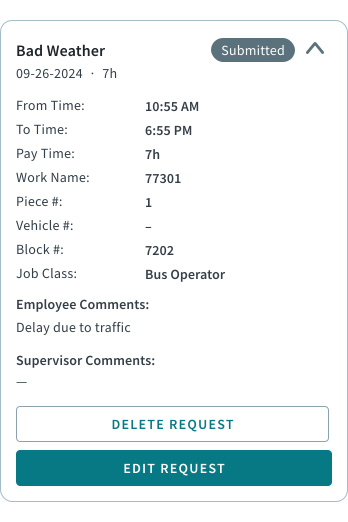
- Select +Request Extra Pay.
-
Select the Work Name for the extra pay request.
The work available for extra pay requests depends on transit agency policies.
- Select the Extra Pay Type.
-
Enter the From Time. If applicable, select
Next Day.
Note:Clock time options are AM and PM. Use the Next Day option if your transit agency's operational day is more than 24 hours long and the entered time isn't in the first 24 hours of the day.
-
Enter the To Time. If applicable, select Next
Day.
If times don't meet the criteria for the selected extra pay type, warnings may appear. For example, From Time must be later than Sign Off Time.
- If required, select a Reason.
- Enter any Comments.
- Select Submit Request.
- Pending. The extra pay type requires approval and a decision hasn't been made.
- Submitted. The extra pay type doesn't require approval.
- Approved. The extra pay type requires approval and the request was granted.
- Denied. The extra pay type requires approval and the request was rejected.