
Itinerary Search Results
The itinerary search results are shown on the Lines and Stops tab.
The following graphic shows some sample results:
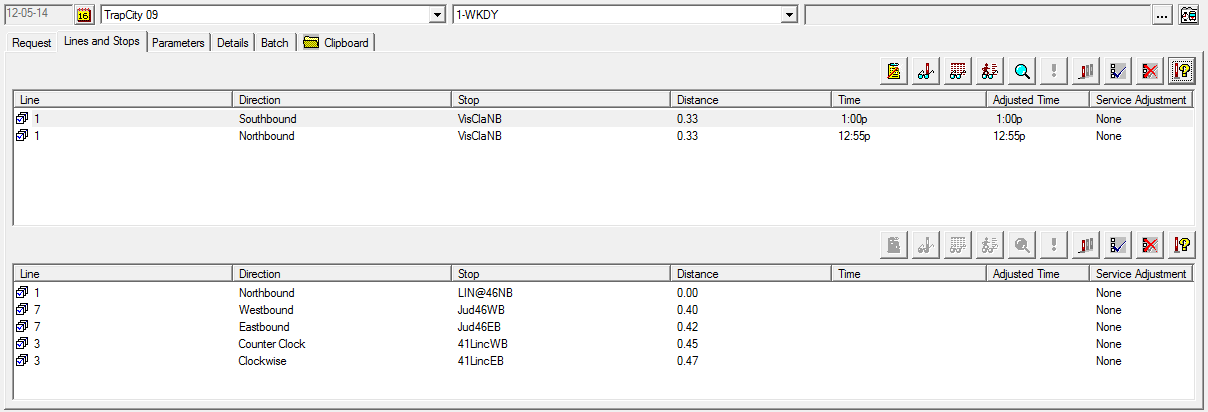
The results show data in the following columns:
- Line
- Lines that include the stops indicated as origin and destination.
- Direction
- Direction of the lines that include the stops indicated as origin and destination. Stop: Specific stops in the itinerary.
- Distance
-
Estimated distance of the stop from the point of origin. Time: Time when the vehicle is estimated to arrive at the stop.
- Adjusted Time
- Time shown is based on the Scheduled time + Schedule Offset (if set) and real time adjustments (if Real Time Manager is running).
- Service Adjustment
- If there are no service adjustments, "None" is shown on the column. If there are any, the common reasons for service adjustments are
- Overload
- More passengers than the maximum capacity of vehicles on the route. Cancel - Trip is canceled for a variety of reasons, for example, bad weather, accident.
- Offset
- Service disruptions caused by various reasons such as events and road closures. For example, a bus is scheduled to go from stop A to stop B in two minutes, however, because an intersection close to the stops is scheduled to be closed from 2:00 p.m. to 3:00 p.m., the trip is estimated to take eight minutes. A service adjustment is then made to offset the scheduled time for any trips running during that time period. Six minutes are added to the scheduled time.
Some codes for the service adjustments that may appear in this column are: Route Adjustment, Schedule Offset, Cancelled Crossing, Cancelled Trip, and Unknown Adjustment.