
Canceling a Trip At Door
After arriving at a pick-up location, you can mark the trip as Cancel At Door.
-
In the Manifest, tap and hold the event you want to cancel.
A menu with a cancel option appears.
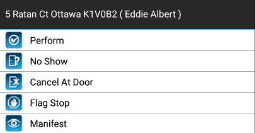
-
Tap Cancel at Door.
Depending on your agency's processes, the cancellation may have to be approved by dispatch before it is confirmed.A confirmation message is displayed. Tap Yes. The event is marked as canceled and the information is sent to the dispatcher.