Performing Group Trip Pick-Ups
After you have marked an event that is part of a group trip as arrived, you can mark all the group trip events as Performed.
-
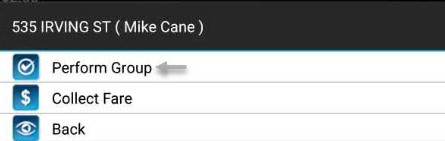
Tap and hold the first passenger in the group.
The menu items displayed vary based on the Group Pickup Rules property settings:
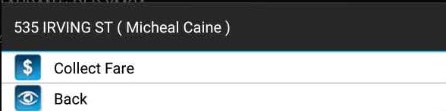
- If set to Must Collect All Fares, the menu has a Collect Fare option but will not include Perform Group until all fares in the trip are collected.
- If set to Quick Perform for Groups, then Perform Groups and Perform options are available. You can perform each trip individually or all the trips in the group at once.
- If set to Optional Group Fare Collection, the Perform Group and Collect Fare options are displayed. You can perform the group trip with or without collecting fares first.
-
If required, tap Collect Fare and update the fare
information. Repeat this for each passenger in the group.
-
Tap Perform Group. If the Group Perform Confirmation
property is enabled, a notification will appear prompting to you to confirm the
Group Perform operation.
The event information is sent to the dispatcher and no longer appears in the Manifest.