
Printing Run Information
You can copy the run information shown on the Runs tab in the text editor that opens by default.
About this task
To specify where the text file is to be saved, click , and on the Profile tab, click .
Procedure
-
Click the Print button:

The Select Grid Columns dialog box appears.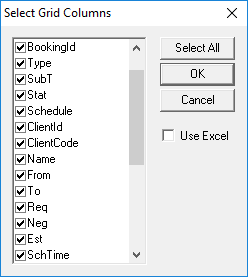
-
Select the columns you want copied to the text file.
Click Select All to toggle between selecting all or none columns to be included in the Runs text file.
-
Click OK.
The text file containing the selected information is shown and saved in the designated folder.
-
In the text file, click .
The information is printed.