
About Trip Booking
Trip Booking allows you to create subscription bookings and casual trips for clients.
A trip consists of travel from one location (pick-up) to another location (drop-off).
A subscription booking defines a series of trips for a client that needs to travel to the same destination from the same origin at fixed times and days. For example, one subscription booking takes John from his home to work Monday to Friday. A different subscription booking takes Maria to her volunteer location every other week on Mondays and Wednesdays at 16:00. A third subscription booking takes Mrs. Sydney to visit the dentist every six months on the first day of that month at 14:00.
Casual bookings are made for trips that are expected to occur once.
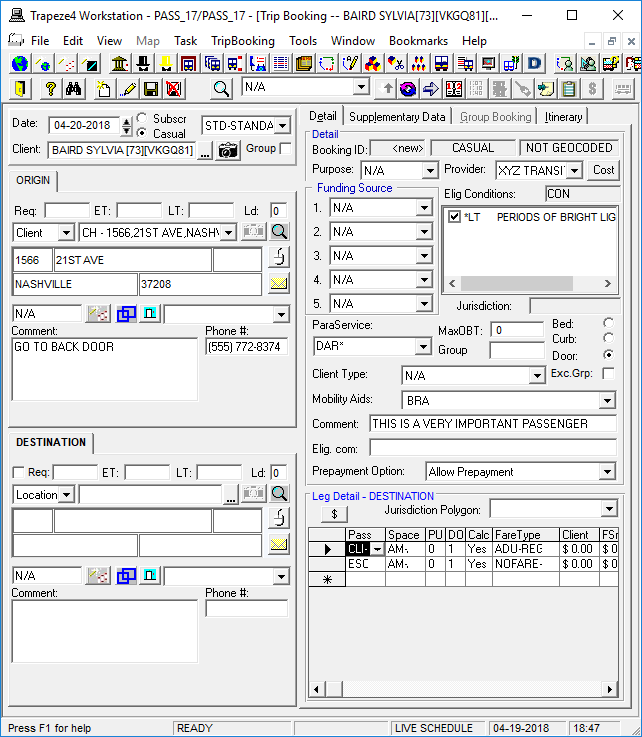
The information collected for bookings is specific to each transit agency.
When creating a booking, you need to define the client (or group) taking the trip, the origin and destination locations (these are the pick-up and drop-off points), and a pick-up or drop-off time. Bookings can be scheduled at the time they are created, or at a future time (depending on how your transit agency operates). System settings also allow most information to be predefined (for example, the booking subtype), and changes can be made to defaults as needed. Other mandatory information will vary depending on site policy and property settings.
Bookings created using Trip Booking can be tracked in Tracker Action Browser. To do this, system administrators should add the action PASS/CreateTrip using the track code CREATE and level 1 in Tracker Actions ancillary data. The tracker action PASS/BookingChange will track users who have modified bookings in Trip Booking, Schedule Editor, or Trip Administration (use the track code MODIFY and level 1).