
Activating Automatic Pick-Up Calculations using Drop-Off Logic
When booking trips, you can use drop-off logic to calculate the pick-up time if a drop-off time is entered in the Destination request field.
Before you begin
About this task
The drop-off calculation is performed based on the desired arrival time, the distance from the client’s origin to the destination, speed factors, and on-board time factors.
You can specify that drop-off logic should be used automatically for all bookings or for casual trip bookings only. If you do not activate automatic drop-off Logic, you can still use drop-off logic when booking a trip by checking the Req check box on the Destination tab of Trip Booking.
Because drop-off logic depends on having exact origin and destination addresses, both addresses must be geocoded before drop-off logic is used.
Procedure
- Click .
-
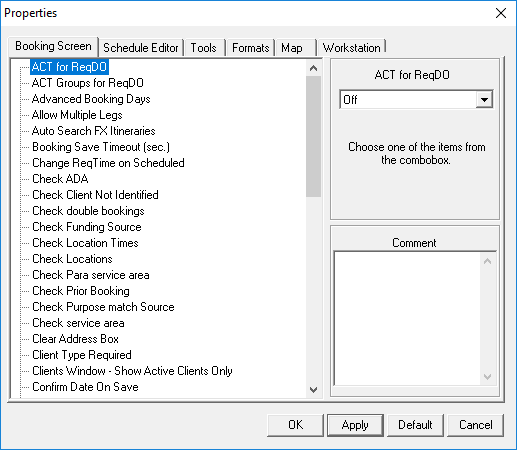
On the Booking Screen tab, click the ACT for
ReqDO property.
An ACT for ReqDO list appears at the right side of the dialog box.
-
Click one of the following options in the list:
-
- On
- Automatically calculate pick-up times when booking trips.
-
- Only Apply to casual Trips
- Automatically calculate pick-up times when booking casual trips.
-
- Off
- Disable automatic pick-up time calculations.
-
- Click OK.