
Assigning Garages to Runs
The From Garage field is used to identify the garage from which the vehicle pulls out at the start of the run.
Before you begin
Procedure
- Search for the run to which to assign a garage.
- Click the Detail tab.
-
In the From Garage field, do one of the following:
Note: This is the garage that the vehicle pulls out of at the beginning of the run.
- Type a forward slash (/) to generate an alphabetical list of all garages. Double-click the appropriate garage name.
- Type the full or partial name of the garage.
The system searches for a match to your entry.
- Click the ellipsis button (…) to use the Select
Garage dialog box.
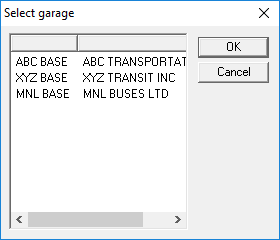
Click a garage in this list and click OK.
-
Select a To Garage.
This is the garage that the vehicle pulls into at the end of the run.
- Click the Save button:
