
Making Client Account (Purse) Adjustments
Deductions are automatically debited from a client purse when a booking is saved or when a booking is canceled.
Before you begin
About this task
Procedure
- In the Client field, search for the client from whom to deduct funds.
- Optional: In the Transactions frame, search for and select the transaction to adjust.
-
Click Account Adjustments.
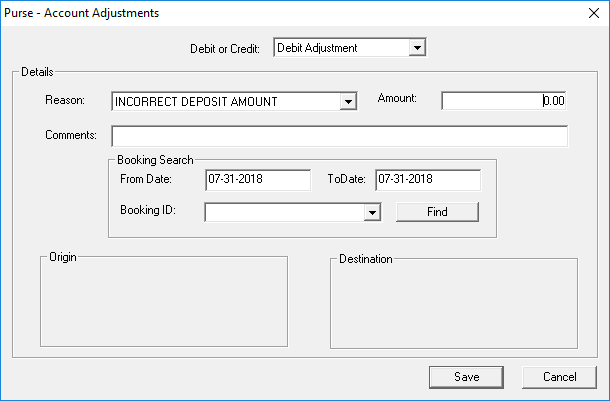
The Purse - Account Adjustments dialog box appears.
-
Provide the following information:
- Debit or Credit
- Whether the transaction is to debit or credit the client’s account.
- Reason
- The reason for the adjustment in the list.
Reasons are defined in ancillary data.
- Amount
- The amount being adjusted.
- Comments
- Any comments about the adjustment.
-
In the Booking Search frame, search for the client trip to be
associated with the adjustment:
- Selecting the From Date and To Date.
- Click Find.
- Click the trip in the Booking ID list.
The trip's Origin and Destination locations are shown at the bottom of the dialog box. -
Click Save.
The Balance is updated with the adjusted amount.
- Click Save to close the dialog box.