
Creating Speed Factors
Speed factors can be created based on time, distance, or a combination of both.
Before you begin
Procedure
-
Click .
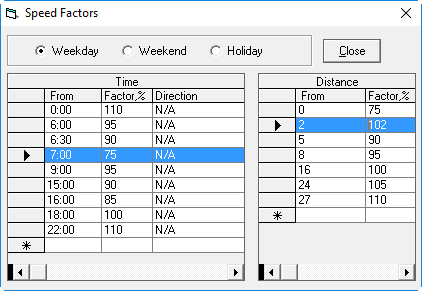
The Speed Factors dialog box appears.
-
To indicate the time for which you are setting a speed factor, select the
Weekday or Weekend option.
Setting speed factors for Holidays is for future implementation. Do not set up any speed factors for holiday schedules.
-
In the Time grid, in the row marked by an asterisk (*), in the
From cell, type the effective time for the speed factor (for
example, 7:00).
Time grids should be built starting from 0:00 (that is, midnight).
-
In the Factor,% field, type a percentage.
This percentage is multiplied by the average speed to determine the desired speed for vehicles at the time you specified. The calculation is Average speed × Factor percent = Desired speed.For example, a high density of traffic is expected from 7:00 A.M. to 9:00 A.M., and the speed factor is set at 75% of the average speed to place the vehicle at a slower speed. If your average speed is 50 mph, using the calculation indicated (50 × 0.75 =37.5), the estimated speed for vehicles traveling at this time of day is 37.5 mph.
- Define any additional speed factors for different times.
- In the Distance grid, in the row marked by an asterisk (*), in the From cell, type the number of miles (or kilometers depending on the unit of measurement used at your site) traveled at which the speed factor takes effect.
-
In the Factor,% column, type a percentage.
This percentage, multiplied by the average speed, determines a desired speed when a specific distance is reached. A vehicle that travels three miles without stopping moves faster than a vehicle that travels three miles with periodic stops.For example, consider the Distance grid. When the distance between two points is greater than or equal to two miles and less than five miles, the speed is increased to 102% of the average speed. Using Average speed × Factor percent = Desired speed (50 × 1.02 = 51), the speed is estimated to have increased to 51 mph for a vehicle that has reached at least two miles but has not reached or exceeded five miles.
- Define any additional speed factors for different distances.
- Click Close.