
Setting Up DB Security
The System Administrator can setup database security for Oracle databases in Trapeze4.
Before you begin
- , see PASS-Related Security Permission Keys for a description.
Procedure
- Open Trapeze4 workstation (mmsw41.exe).
-
Select .
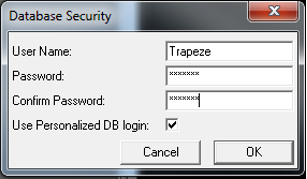
Database Security dialog box is open
-
Complete the following fields:
- User Name:
- Password:
- Confirm Password:
-
Select the Use Personalized DB
login: checkbox.
Note: If the checkbox is selected, this will use your personal login to connect to the database. If the checkbox is not selected then it will use the user name and password credentials from the database security dialog box.
- Click OK.
What to do next
- Profile/Database/PrimaryUsername=Trapeze
- Profile/Database/PrimaryPassword=u2PI+hRxBro+4vj7Dm0j
You can also copy this file to all BIN folders in Trapeze4 and Trapeze5 (Plugin/BlockBuster) folders if this type of security is used.