
About Searching for Addresses, Locations, and Points
You can search for shelter records based on geocoded street addresses, locations, and points.
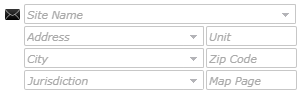
You can enter part of an address to increase the likelihood of finding a match. If you type 985 Main in the Address field instead of 985 Main St, the system returns a list of all addresses that start with 985 Main, such as 985 Main St, 985 Main Blvd, and 985 Main Pkwy, if they exist in your map.
While typing an address or a street name, the system will use the Soundex algorithm if the functionality is enabled. In a Soundex search, the system searches for records with similar consonant sounds rather than street names with similar spellings. For example, if you type man in an address field, the system might return main, many, and mineral because these words have similar consonant sounds.
If you know only the relative location of an address, you can search for the intersection by typing two street names separated by an at sign (@) in the Address field.
After you click Search, the Address Matcher will return any addresses that match the information that you entered. You can then select the appropriate geocode to assign to that address. If you search for an address that is associated with common locations, you may have the option to choose either the street address or the location name, depending on your system settings.
Searching for Locations
You can enter part of a location name to increase the likelihood of returning matches in a search. For example, if you type Main in the Site Name field, the system returns a list of all locations with Main in their names.
The system uses a text search when searching for location names. If you do not use the correct spelling when searching for a location name, the system cannot return the correct location. However, if you enter only part of the location name, you can use the percent sign (%) as a wild card character. For example, to find a location whose name ends with er, you can enter %er as the search criterion.
If the Address Matcher returns multiple locations that match the information that you enter, you can select the appropriate geocode.
If you cannot find the correct address or location, you must manually geocode the address.