
Adding Missing Travels
BlockBuster only attempts to cut runs with valid travels. If it does not find a travel, a message is displayed indicating that there are missing travels.
-
Click .
The Missing Travels dialog appears. (This is similar to the Missing Travels dialog in Trapeze FX.)
-
Choose the type of travel you want to add:
- Swing: This is selected by default.
- Garage: If selected, the AllConnect check box is activated. If you have more than one garage in the Division and want to see all missing travels between the nodes and all garages, select the AllConnect check box.
-
Click Display.
The missing travels appear in the left frame of the dialog.
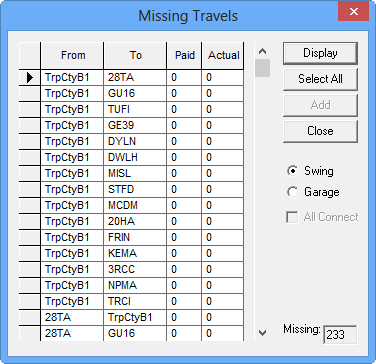
- Select the travels you want to add to the Travels grid. Alternatively, to select all, click Select All.
- Fill in the paid and actual time of the selected travels as applicable.
-
Click Add.
The selected travels are removed from the dialog and added to the Travels grid.
- Click Close.