
Adding Extra Piece to any Run
You can add an extra piece to any run or to create a new piece that becomes a run.
-
Perform one of the following steps:
- Click
- Click the Cost button:

The Run Cost dialog appears.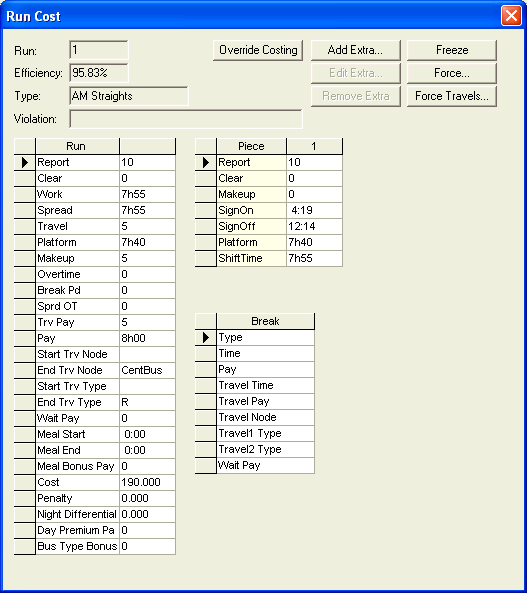
The values shown in the Run pane are based on what you have defined on the Parameters tabs. For example, the Penalty value is determined by the lower and upper limits set for the Penalty parameters. The Cost value is based on the calculation of the values of what constitutes a run according to your agency policies and union rules.
-
Click Add Extra. The Add Extra Piece dialog appears.
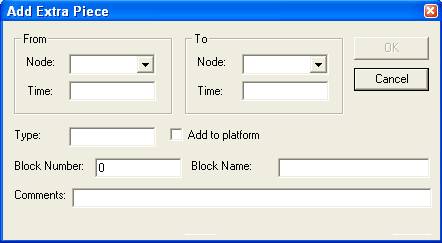
The dialog shows the Run# field, which allows you to identify the run to which you want to add the extra piece.
-
Choose the appropriate nodes from the Node drop-down lists in the From and To frames. The Node lists
contain all nodes in the context (not only nodes that are garages).
In the Time fields in the From and To frames, type the times when the extra piece begins and ends, respectively.
- In the Type field, type the appropriate type (for example, AR).
- To add the extra piece time to the run platform time, select the Add to platform checkbox. This applies only to the selected piece in the selected run.
-
Depending on your site’s requirements, perform the
following additional steps:
- Type the appropriate values in the Block Number and/or Block Name fields.
- Type a detailed description of the extra piece in the Comments field.
- Fill in the supplementary data fields as appropriate. (The supplementary data fields are only shown if they have been previously defined.)
- In the Run # dropdown list, select the applicable run.
- Click OK.
To add an extra piece of work to a specific portion of a run or to selected runs, use the Generate Extra Piece feature.