
Setting the Default for Exception Runs
The first step when runcutting blocked pieces that contain exceptions is to select an exception combination that is used for cutting the base set of runs.
- Appears most often in the sign-up period
- Contains the most platform time
-
Click .
The Default Run Exceptions dialog appears. The exception combinations of the selected service group with which the selected exceptions are compatible appear in the Exception Combinations list.
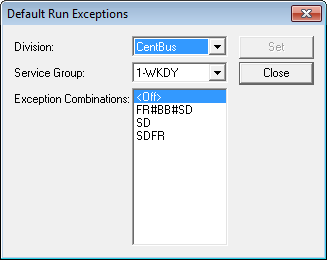
- In the Exception Combination list, select the appropriate exception combination.
- Click Set.
- Click Close.
-
Press F3.
The Set Mode dialog appears.
- In the Exception Combo list, select the same exception combination you selected in step 2 to set it for your current context.
-
Click OK. The system creates
a scenario for every exception.
To cut exception runs, perform runcutting based on your usual procedure.