
Checking Your Off-Day Statistics
Off Day Statistics provides you with a complete summary of the assigned and unassigned work in rosters. Off days are the days that operators are scheduled to take time off from work.
-
Click .
The Off-days Statistics dialog box appears. The All option is selected by default.
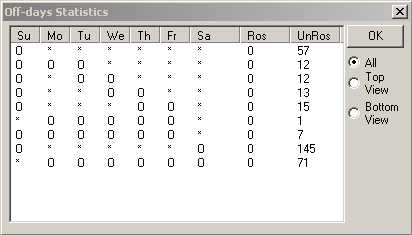
A series of asterisks and zeros under each Day column is shown on the grid. The number of rostered and unrostered runs are also shown on the last two columns. These numbers give you an idea of which runs you can combine.
The sample data shows that you can first combine your weekdays with Saturdays. The Off day statistics always show all rosters in the UnRos (Unrostered) column until you assign the Off days in the final phase of rostering.