
Rostering Screen Columns
The table describes the columns in the Rostering screen.
| Column Heading | Description |
|---|---|
| State | This column is similar to the St column in the
Cut Pieces grid in the Runcutting screen.
It may display any of the letters: F, C, M, N and O, which indicate that an action or
condition has been applied on the roster. (The letter O indicates that Off days have
been designated for the roster. It applies only to Roster grids.) The column also shows tags below the conditions, if any. The State field is empty if the roster is legal and has no condition applied to it. |
| Roster (Crew) | Shows the roster number and the roster type. When you first load rosters, this column is blank. At some sites, the roster number may be the same as the operator’s badge number. |
| Values | Shows the row names of the data shown in the grid as selected in the
Display Options frame of the Display
tab.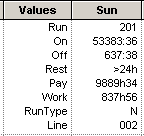
|
| Days of the Week | Each day of the week has a designated column. The start of the week is Sunday by default. If necessary, choose the order of the columns showing the days of the week to match your transit site requirements. |
| Pay | The total pay of all runs combined in the current row. The pay varies depending on your costing routine and whether your transit site pays any other premiums on rosters. If the All Totals check box on the Display tab is marked, this changes into Totals. |