
Identifying Line Groups for Driver Blocks
You can identify line groups for driver blocks using the Line Groups tab in the Lines dialog box.
-
Click .
The Lines dialog box appears.
- On the Line Groups tab, select the line group in which you want to create driver blocks.
-
Click Edit.
The Edit box appears.
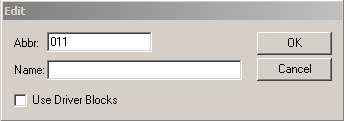
The number of the selected line group appears in the Abbr field.
- In the Name field, type an appropriate name for the line group.
- Select the Use Driver Blocks check box.
-
Click OK.
On the Line Group tab, the initials DB appears beside the selected line group.
- Click Close.
-
On the Blocking screen, click the Close
button:

- Open the Blocking screen again and check that the screen name on top of the screen also shows the same identifier as follows: [Blocking <D-Blk>].