
Updating Relief Events
If changes have been made on the runs, make sure to update the relief events.
-
Click .
The Update Reliefs dialog box appears.
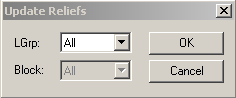
- In the LGrp list, select the appropriate line group or to include all groups, select All. Selecting a line group enables the Block field.
- Optional: From the Block list, select the applicable block or to update all blocks, select All.
-
Click OK.
If your transit site has many relief points, the updating process may take some time.